Single phase flow convergence failure

Dear MFiX Developers

I am currently running a simple 3D single-phase gas flow simulation and have encountered an immediate solver crash issue (DT<DT_MIN Recovery not possible) that has plagued me for over a week. I have tried multiple troubleshooting approaches without success and am writing to seek your assistance.

My original case features a regular rectangular prism geometry with dimensions X=11 m, Y=16 m, Z=0.16 m (only the Z-direction width is adjustable). I initially used a uniform structured grid of 4 cm × 4 cm × 4 cm, resulting in approximately 440,000 total cells. The boundary conditions are as follows: a 1 m × 0.16 m velocity inlet on the left face with an inlet velocity of 0.85 m/s, a pressure outlet at the upper right face set to 101.125 kPa, a mass flow outlet at the bottom right face, and no-slip walls on all remaining surfaces. I set the time step to 5×10⁻³ s, but the simulation crashes immediately after startup with no convergence history or intermediate results output .

To identify the root cause, I conducted two sets of controlled experiments. In the first approach, I kept the grid size constant and gradually reduced the Y-direction geometry dimension. When Y=8 m with 220,000 cells, the solver still crashed. However, when Y was reduced to 2.5 m with 68,750 cells, the simulation ran successfully and produced expected flow field results. I initially hypothesized that excessive total cell count was causing the cras h.

To verify this hypothesis, in the second approach, I maintained the original X=11 m, Y=16 m geometry and progressively coarsened the grid to reduce total cell count. I sequentially tested grids of 8 cm × 8 cm × 4 cm (110,000 cells), 10 cm × 10 cm × 4 cm (70,400 cells), and 20 cm × 20 cm × 4 cm (17,600 cells). All of these cases resulted in immediate solver crash es.

These two sets of experimental results present a clear contradiction. They demonstrate that the issue is not caused by excessive total grid count, but rather is related to the Y-direction geometry dimension itself or the combination of geometry and boundary conditions. I must retain the original X=11 m, Y=16 m dimensions for my study. I have uploaded the complete bug file for the 20 cm × 20 cm × 4 cm grid c ase.

I sincerely request your help in identifying the source of this problem. Any guidance or suggestions would be greatly appreciated. Thank you very much for your time and assist ance.

The error message is as fo llows:

0610_littletry_2026-06-11T191557.310553.zip (10.1 MB)

First I strongly recommend you upgrade to the latest version of MFiX (delete ic_des_fit_to_region as it is deprecated now).

The FAQ (13. Frequently asked questions — MFiX 26.1 documentation) provides some suggestions on what could help with non-convergence. Here you are running with an incompressible fluid, and the pressure equation fails to converge. Increasing the number of linear solver iterations helps with convergence:

I tested with your original grid spacing of 4cm and it ran fine. When troubleshooting, you can also use FOUP instead of Superbee as it will generally be easier to converge as well. Your outlet ash BC is set to mass outflow but has a zero velocity, please review.

Also, to be clear non-convergence is not really a “crash” - crash implies abnormal exit. DT<DT_MIN is a deliberate exit. The default value of DT_MIN is 1e-6. In addition to Jeff’s suggetstions, you can always try setting DT_MIN lower.

First of all, thank you for your suggestions. To save computational cost, I chose a grid size of 10 cm × 10 cm × 4 cm, with a total cell count of about 70,000. By increasing the number of iterations for the Gas‑pressure linear solver, I successfully ran the single‑phase flow case. In addition, I built a geometric model to perform a pure CGP particle flow simulation (i.e., without solving the gas continuity equation).

As the next step, I plan to enable the fluid solver under the MFiX‑CGP framework to couple the gas flow. However, I encountered the DT < DT_MIN convergence error again. To address this, I have tried setting the outlet ash boundary to pressure outflow, increasing the linear solver iterations, and lowering DT_MIN to 1e‑7, but the problem persists. I also consulted the User Guide recently but did not find a working solution.

Regarding your suggestion to upgrade to the latest MFiX version, this is unfortunately not feasible for me because the cluster system I use runs CentOS 7, which is locked by the storage architecture and cannot be upgraded. Moreover, installing a newer MFiX version on this system is quite complicated. Therefore, I must continue using MFiX 23.1 for now.

I have attached my bug report for your reference. In addition, I would like to ask: if I want the outlet ash boundary to allow only particles to flow out but not gas, how should I configure the boundary conditions?

0610_littletry_2026-06-16T211922.951849.zip (47.8 MB)

The first step before running the simulation is to inspect the mesh. It is too coarse the resolve the thin walls, and you should extend the stl file in the z-direction to get a better intersection. You may not be able to refine the mesh due to the particle size, so the alternative is to increase the wall thickness.

The wall thickness of the current model is 10 cm, and the total geometric width in the Z-direction is 16 cm. The mesh has been refined to 5 cm × 5 cm × 4 cm, but the numerical instability issue with (DT<DT_MIN) still occurs. I would like to ask whether expanding the geometric width along the Z-axis can improve the mesh intersection quality, and if so, to what width should it be extended; alternatively, is thickening the wall the required measure to optimize mesh quality?

Did you visualize the mesh? I like to look at the Boundary mesh (hide everything else). With a grid spacing of about 5cm, you should see something like this:


There is a bad cell highlighted in the red circle. This needs to be fixed before running the simulation. You can adjust the grid spacing and the meshing tolerances, or even round off the sharp corners /increase the wall thickness to achieve this.

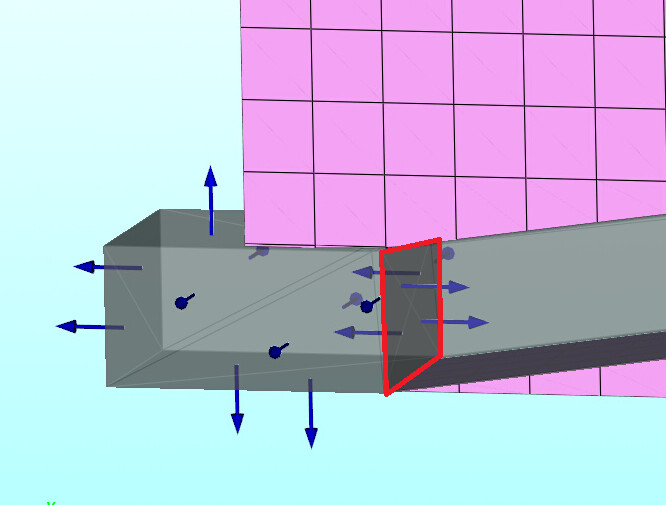
Now looking at the stl geometry, I see some internal walls (red outline):


These need to be removed too before doing the meshing. There are other internal walls elsewhere in the geometry.

The domain extent in the z-direction goes from z=0 to z=0.16m. The stl extent needs to be wider than the domain (background grid). I didn’t want to edit the stl file, so I set the domain extent from z=0.01m to z=0.15m. That way the stl file hangs out by 1cm. If you want to keep the domain extent from z=0 to z=0.16m, make the stl go from z=-0.01m to z=0.17m.

Thickening the wall is only necessary if you cannot refine the mesh. You need a grid spacing that is larger that the largest particle size yet fine enough to resolve the geometry. You will need to find the right balance.