Boundary conditions
General boundary conditions
The following inputs are defined using the prefix bc:
Description |
Type |
Default |
|
|---|---|---|---|
regions |
Regions used to define boundary conditions. Supported shapes for
mass inflow, pressure inflow, pressure outflow, no-slip and slip walls
include |
Strings |
None |
The type of the boundary conditions in the BC region must be defined with the prefix bc:
Description |
Type |
Default |
|
|---|---|---|---|
[region_name] |
Specify boundary condition type. Options:
|
String |
None |
For each boundary condition the reference frame is defined using the prefix bc.[region_name]:
Description |
Type |
Default |
|
|---|---|---|---|
reference_frame |
Specifies the reference frame used to interpret velocity components.
|
String |
inertial |
pressure |
Fluid pressure [required if bc type is |
Real |
None |
Fluid settings
For each boundary condition region, the fluid inputs are defined
using the prefix bc.[region_name].[fluid_name]:
Description |
Type |
Default |
|
|---|---|---|---|
density |
Fluid density [required if bc type is |
Real |
None |
temperature |
Fluid temperature [required if bc type is |
Real |
None |
species.[species_name] |
Mass fraction of |
Real |
None |
normal |
Specify the flow direction for mass inflows. Providing a normal is optional with all flows applying the boundary normal by default. |
Reals<3> |
None |
inflow_type |
Specify the mass inflow
|
String |
None |
velocity |
Specify the velocity magnitude as a constant or as a function of space and/or time: f(x,y,z,t). |
Equation |
None |
volflow |
Specify the volumetric flow rate as a constant or as a function of time: f(t). |
Equation |
None |
massflow |
Specify the mass flow rate as a constant or as a function of time: f(t). |
Equation |
None |
Below is an example for specifying boundary conditions for fluid (fluid).
bc.regions = inflow outflow

bc.inflow = mi
bc.inflow.fluid.density     =  1.0
bc.inflow.fluid.temperature =  300
bc.inflow.fluid.species.O2  =  0.0
bc.inflow.fluid.species.CO  =  0.5
bc.inflow.fluid.species.CO2 =  0.5
bc.inflow.fluid.inflow_type =  velocity
bc.inflow.fluid.velocity    =  0.015

bc.outflow = po

bc.outflow.pressure =  0.0
Below is an example for specifying a normal inflow velocity magnitude for a region eb-flow.
bc.regions = eb-flow

bc.eb-flow = eb

bc.eb-flow.my_fluid.velocity = 0.1
Below is an example where only specific cells are imposed a velocity inflow in the x-direction.
bc.regions = eb-flow

bc.eb-flow = eb

bc.eb-flow.eb.normal_tol = 3.0
bc.eb-flow.eb.normal =  0.9848  0.0000  0.1736  # 10 deg

bc.eb-flow.my_fluid.inflow_type = velocity
bc.eb-flow.my_fluid.velocity = 0.1
Solids settings
For each inflow boundary condition region, general solids inputs are defined using the prefix bc.[region_name]:
Description |
Type |
Default |
|
|---|---|---|---|
solids |
Name of solid type in BC region. Only one solid is allowed in a BC region. |
String |
None |
Warning
Mass inflow boundary conditions, bc.[region_name] = mi, only support PIC parcels. EB inflow boundary conditions,
bc.[region_name] = eb, support DEM particles and PIC parcels.
For mass inflow boundary conditions, the solids inputs are defined using the prefix bc.[region_name].[solid_name]:
Description |
Type |
Default |
|
|---|---|---|---|
volfrac |
Volume fraction. |
Real |
None |
temperature |
Temperature. |
Real |
None |
species.[species_name] |
Mass fraction of |
Real |
None |
velocity |
Velocity components. |
Reals |
None |
volflow |
Volumetric flow rate. |
Real |
None |
For inflow boundary conditions, diameter and density distributions can be specified.
The following inputs control the diameter distribution and are defined with
the prefix bc.[region_name].[solid_name].diameter
Note that diameter distributions must define a weighting type, please refer to ReferenceParticleDistributions.
Description |
Type |
Default |
|
|---|---|---|---|
distribution |
Type of distribution for particle diameter in the BC region. This is only used for inflow boundary conditions. Options:
|
String |
None |
weighting |
Weighting for diameter distribution. Options:
|
String |
N/A |
bins |
Number of bins used when discretizing the diameter distribution to approximate the number of particles within a boundary condition region. |
Int |
64 |
constant |
Monodisperse (single valued) particle diameter.
Required for |
Real |
None |
mean |
Distribution mean.
Required for |
Real |
None |
std |
Distribution standard deviation.
Required for |
Real |
None |
min |
Minimum diameter to clip distribution.
Required for |
Real |
None |
max |
Maximum diameter to clip distribution.
Required for |
Real |
None |
custom |
File name that specifies either the cumulative or probability
distribution. Required for |
String |
None |
interpolate |
For |
Bool |
false |
The following inputs control the density distribution and are defined with
the prefix bc.[region_name].[solid_name].density:
Description |
Type |
Default |
|
|---|---|---|---|
distribution |
Type of distribution for particle density in the BC region. This is only used for inflow boundary conditions. Options:
|
String |
None |
constant |
Monodisperse (single valued) particle diameter.
Required for |
Real |
None |
mean |
Distribution mean.
Required for |
Real |
None |
std |
Distribution standard deviation.
Required for |
Real |
None |
min |
Minimum density to clip distribution.
Required for |
Real |
None |
max |
Maximum density to clip distribution.
Required for |
Real |
None |
custom |
File name that specifies either the cumulative or probability
distribution. Required for |
String |
None |
interpolate |
For |
Bool |
false |
Transient boundary conditions
Temperature and species boundary conditions may also be specified as a function of time by adding a new column. The time value is entered in the new first column. We can make the mi boundary condition above time-dependent by replacing:
bc.inflow.fluid.inflow_type = velocity
bc.inflow.fluid.velocity    = "max(t/3., 1.)*0.015"

bc.inflow.fluid.temperature =  0.0  300
bc.inflow.fluid.temperature =  2.99 300
bc.inflow.fluid.temperature =  3.0  500
bc.inflow.fluid.temperature =  4.0  500
bc.inflow.fluid.temperature =  4.01 300
In the above example, the inflow velocity is accelerated from zero to its final value over a period of three seconds. The temperature sees an abrupt spike from 300 up to 500 at t = 3s and then back down again after 4s. Note that the timestep is not adjusted to sync with transient BCs.
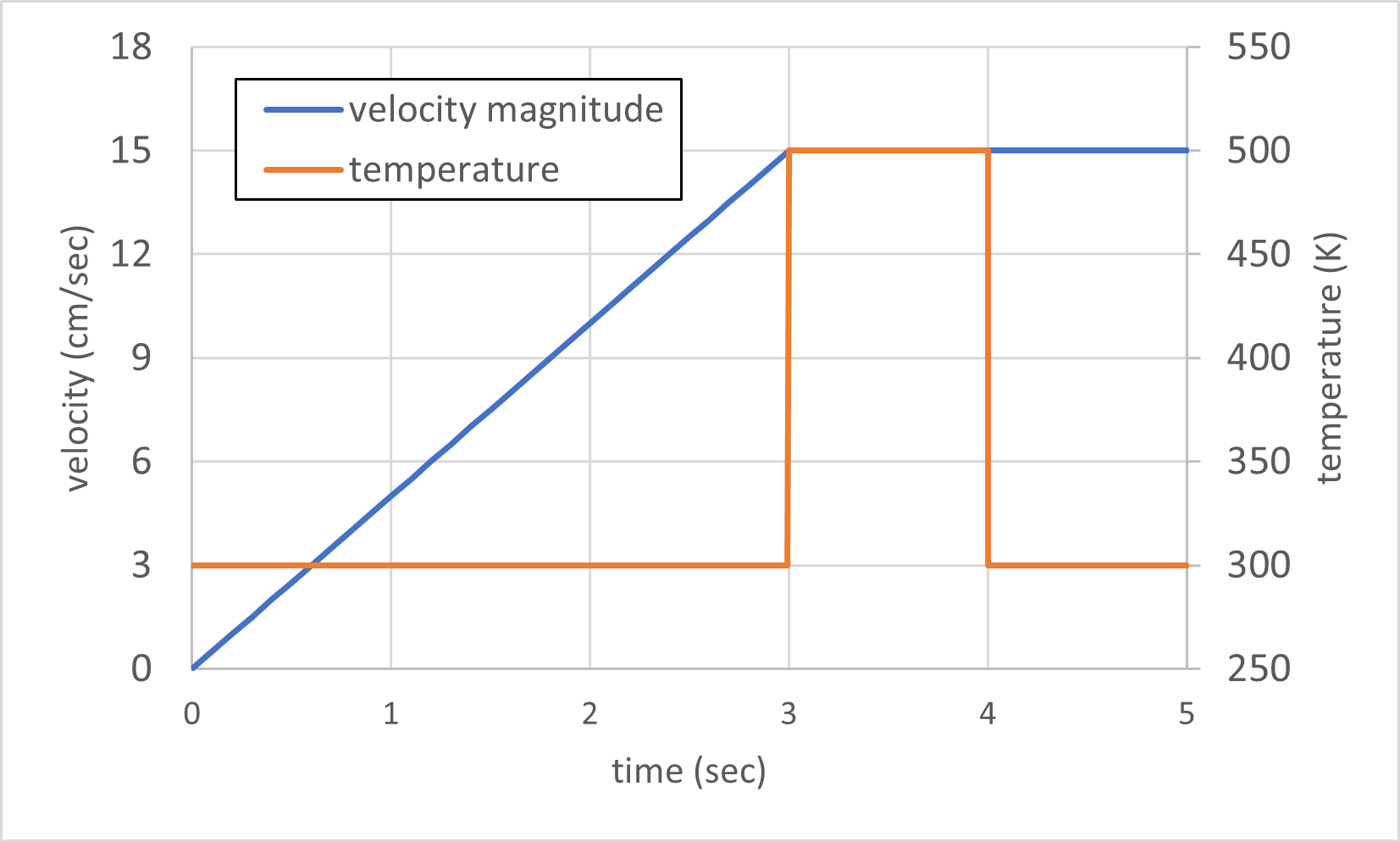
Fig. 9 Linear velocity ramp to 15 cm/s (0–3 s), constant thereafter; temperature step from 300 K to 500 K (3–4 s) then return to 300 K
Thermal boundary conditions
Boundary conditions can be applied to embedded boundaries (EBs). For example, a constant wall temperature can be imposed on the entire EB or restricted to a specific region.
To apply a boundary condition to only a portion of an EB, a face normal vector and tolerance can be specified. This
allows the condition to be applied only to EB faces whose normals align with the specified direction within a given
angular tolerance. The following inputs are defined using the prefix bc.[region_name].eb:
Description |
Type |
Default |
|
|---|---|---|---|
normal |
[Optional] Specifies the target face normal direction. Only EB faces whose normals are parallel (within the specified tolerance) will have the boundary condition applied. |
Reals<3> |
None |
normal_tol |
[Optional] Angular tolerance (in degrees) used with |
Real |
0 |
The following table lists the thermal boundary condition options that can be applied to embedded boundaries (EBs), with
inputs defined using the prefix bc.[region_name].eb.
Description |
Type |
Default |
|
|---|---|---|---|
temperature |
Specify a wall temperature model for the embedded boundary. Options:
|
String |
adiabatic |
temperature.constant |
Constant wall temperature.
A valid is required for |
Real |
None |
The conjugate heat transfer model approximates heat transfer through the embedded boundary using a one-dimensional thermal resistance representation. By default, the wall temperature is computed from an algebraic heat balance; optionally, a lumped-capacity transient wall model can be enabled.
The external environment is treated as a thermal reservoir with constant temperature \(T_{\infty}\). Heat is transferred from the fluid to the inner wall surface, through the wall, and then from the outer wall surface to the environment, as illustrated in Fig. 10.
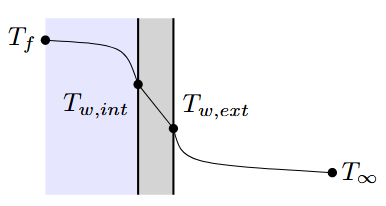
Fig. 10 Schematic of the conjugate heat transfer boundary condition.
The effective outward thermal conductance per unit area is
where \(L_w\) is the wall thickness, \(\kappa_w\) is the wall thermal conductivity, and \(h_{ext}\) is the external convective heat transfer coefficient. This expression represents the combined resistance of conduction through the wall and convection from the outer wall surface to the environment.
For the zero-capacity wall model, the inner wall temperature is determined from an algebraic heat balance between internal convection, radiation, and heat transfer to the environment:
where \(h_{int}\) is the internal convective heat transfer coefficient. Positive \(q_{rad}\) denotes radiative heat loss from the wall. By default, the CHT-1D wall has no thermal storage, so the wall temperature responds instantaneously to changes in the local heat balance.
If a wall heat capacity \(C_A\) [J/(m²·K)] is specified, the wall is modeled as a lumped thermal mass with a single spatially uniform temperature. In that case, the wall temperature evolves according to
In this lumped-capacity approximation, the inner and outer wall temperatures are not resolved separately; instead, the wall is represented by a single transient temperature. When \(C_A = 0\) or is not specified, the algebraic wall temperature model is used.
The model settings are defined using the prefix bc.[region_name].eb.temperature.CHT-1D:
Description |
Type |
Default |
|
|---|---|---|---|
T_env |
Environment temperature |
Real |
None |
h_int |
Heat Transfer Coefficient (fluid–wall, internal). Specifies the convective heat transfer coefficient [W/(m²·K)] between the fluid and adjacent solid walls (EBs) located within the interior of the computational domain. |
Real |
None |
h_ext |
Heat Transfer Coefficient (wall-environment, external). Specifies the convective heat transfer coefficient [W/(m²·K)] between the wall and the external environment. |
Real |
None |
wall.conductivity |
The thermal conductivity of the wall. |
Real |
None |
wall.thickness |
Wall thickness. |
Real |
None |
wall.heat_capacity |
Lumped wall heat capacity per area [J/(m²·K)] |
Real |
|
phase_averaged_temperature |
Use a phase-averaged temperature for simulations containing particles. The phase-averaged temperature is computed per-cell as the volume-fraction-weighted sum of the fluid and averaged particle temperatures:
where the averaged particle temperature is computed per-cell as:
|
Bool |
false |
Below is an example for specifying a constant temperature boundary condition in the hot-walls region.
bc.regions = hot-walls

bc.hot-walls = eb
bc.hot-walls.eb.temperature = constant
bc.hot-walls.eb.temperature.constant = 800
Radiation
The following table lists the thermal boundary condition options that can be applied to embedded boundaries (EBs), when the radiation solver is enabled. All EB surfaces must have radiation properties defined when the radiation solver is enabled.
The following inputs defined using the prefix bc.[region_name].eb.radiation.emissivity.
Description |
Type |
Default |
|
|---|---|---|---|
model |
Specify which radiation emissivity coefficient model to use for the embedded boundaries. Options:
An emissivity model is required if radiation is enabled. |
String |
None |
form |
Specifies the polynomial form used to represent the absorption coefficient as a function of temperature. Options:
|
Int |
0 |
T_range |
Valid temperature range for the polynomial. If no temperature is provided, then the polynomial is assumed valid for all temperatures. Piecewise polynomials are defined by specify multiple ranges. For example, two piecewise polynomials can be specified by providing three temperatures: low, mid and high. |
Reals |
None |
polynomial_coeffs |
Polynomial coefficient. Polynomials can be up to 5-th order, and a set of polynomial coefficients must be defined for each temperature range. |
Reals |
None |
Example: Constant valued emissivity
A constant value is used over the entire valid temperature range.:
regions = sphere ...

regions.sphere.shape = sphere
regions.sphere.sphere.radius = 0.25
regions.sphere.sphere.center = 0.0  0.0  0.0

bc.regions = sphere ...

bc.sphere.eb.radiation.emissivity.model = "gray-poly"
bc.sphere.eb.radiation.emissivity.polynomial_coeffs = 1.0