Model options
The following inputs are defined using the prefix mfix:
Description |
Type |
Default |
|
|---|---|---|---|
gravity |
Gravity vector. |
Reals<3> |
0 0 0 |
Enabling solvers
The following input is defined using the prefix mfix:
Description |
Type |
Default |
|
|---|---|---|---|
enable.fluid |
Enable the fluid solver. |
Bool |
false |
enable.solids |
Enable the solids solver for DEM or PIC. |
Bool |
false |
enable.species |
Enable the MFIX species solver. |
Bool |
false |
enable.energy |
Enable time evolution of fluid temperature and enthalpy. |
Bool |
false |
enable.radiation |
Enable the radiation solver. This solver must be built with RTE enabled. |
Bool |
false |
Fluid options
The following inputs are defined using the prefix fluid.enable:
Description |
Type |
Default |
|
|---|---|---|---|
density_advection |
Enable time evolution of fluid density. |
Bool |
false |
momentum_conservative_update |
Use the conservative form (\(\nabla \cdot (\varepsilon \mathbf{u} \rho \mathbf{u})\)) of the fluid momentum update
when |
Bool |
false |
The following inputs are defined using the prefix mfix:
Description |
Type |
Default |
|
|---|---|---|---|
constraint |
Select low Mach number constraint. Options (case-insensitive):
|
String |
IncompressibleFluid |
thermodynamic_pressure |
Thermodynamic pressure.
A value is required when using the
|
Real |
0 |
advection_type |
Advection scheme. Options:
|
String |
Godunov |
cfl |
CFL constraint (dt < cfl * dx / u)
|
Real |
See note |
redistribution_type |
Algorithms to address the ‘small cell problem’ associated with explicit cut-cell algorithms. Options: |
String |
StateRedist |
redistribute_before_nodal_proj |
Redistribute the velocity field before the nodal projection. |
Bool |
true |
redistribute_nodal_proj |
Redistribute the velocity field after the nodal projection. |
Bool |
false |
redistribute_after_initial_nodal_proj |
Apply the selected redistribution algorithm to small cells if doing an initial projection of the velocity field. |
Bool |
true |
correction_small_volfrac |
Threshold volume fraction for correcting small cell velocity at the end of the predictor and corrector. |
Real |
1.e-4 |
godunov_include_diff_in_forcing |
When using Godunov, include viscous/diffusive terms in forcing terms. |
Bool |
true |
godunov_use_ppm |
When using Godunov, use piecewise parabolic (PPM) instead of piecewise linear (PLM) reconstruction. |
Bool |
false |
godunov_use_forces_in_trans |
When using Godunov, add forcing terms in the construction of transverse velocities. |
Bool |
false |
godunov_use_mac_phi |
When using Godunov, don’t include the pressure gradient in the forcing term passed into the Godunov routine; instead use gradient of mac phi which contains the full pressure. |
Bool |
false |
Note
The thermodynamic pressure is a scalar value, not a scalar field. This is a consequence of the low Mach number assumption.
Particle options
The following inputs are defined using the prefix solids:
Description |
Type |
Default |
|
|---|---|---|---|
enable.momentum |
Flag to update particle velocity and position. |
Int |
1 |
enable.energy |
Flag to update particle temperature and enthalpy. |
Int |
1 |
energy.source |
User defined enthalpy source for particles. |
Real |
|
prevent_outflow |
Prevent particles from exiting at pressure outlets. |
Int |
0 |
Constraints
Additional constraints may be imposed on problems which are under-determined such as particle settling in a fully periodic domain. Currently, only particle constraints are supported.
The following inputs are defined using the prefix solids.constraint:
Description |
Type |
Default |
|
|---|---|---|---|
model |
Constraint type. Options:
|
String |
None |
mean_velocity_x |
mean particle velocity in x-axial direction |
Real |
None |
mean_velocity_y |
mean particle velocity in y-axial direction |
Real |
None |
mean_velocity_z |
mean particle velocity in z-axial direction |
Real |
None |
Below is an example for zero mean particle velocity in all three directions.
solids.constraint.model = "mean_velocity"

solids.constraint.mean_velocity_x = 0.
solids.constraint.mean_velocity_y = 0.
solids.constraint.mean_velocity_z = 0.
In the above example, at the end of each (fluid) time step, the global mean particle velocity is computed in each direction, then subtracted from each particle’s velocity vector so that the mean particle velocity for the system is zero.
Fluid-particle coupling
Drag coefficient
The following input is defined using the prefix mfix.drag:
Description |
Type |
Default |
|
|---|---|---|---|
model |
Fluid-particle drag model. Options: |
String |
None |
model.SyamOBrien.c1 model.SyamOBrien.d1 |
Fitting parameters for |
Real |
None |
virtual_mass |
Include virtual mass force in fluid-particle momentum transfer. The virtual mass force is not included by default.
Options:
|
String |
None |
virtual_mass.constant |
Constant virtual-mass coefficient. |
Real |
0.5 |
include_divtau |
Interpolate the fluid shear stress to particles and include in the fluid-particle drag force. The force is applied to the fluid by multiplying the shear stress by fluid volume fraction. |
Int |
0 |
lift.model |
Include lift force in fluid-particle momentum transfer.
Options:
|
String |
None |
lift.Auton.coeff |
Constant coefficient for Auton lift force model. |
Real |
0.5 |
lift.Tomiyama.surface_tension |
Surface tension in Tomiyama lift force model. |
Real |
None |
Note
The UserDrag keyword is used to invoke a user-defined drag model. This is accomplished
by copying src/usr/usr_drag.cpp file into the build directory, implementing the desired
drag model, and recompiling MFIX-Exa. An example can be found in tests/DEM06-x.
Heat transfer coefficient
The following input is defined using the prefix mfix.convection:
Deposition scheme
The following inputs are defined using the prefix mfix.deposition:
Description |
Type |
Default |
|
|---|---|---|---|
type |
The algorithm used to transfer particle properties to the Eulerian grid. An overview of the schemes is provided below. Options:
|
String |
trilinear |
scale_factor |
The deposition scale factor. Applicable only with |
Real |
1.0 |
In the following subsections, the four deposition methods are briefly described and illustrated.
Centroid
The centroid deposition scheme transfers particle properties, for example volume, to the Eulerian grid cell containing its center. Illustrated in two-dimensions below, the particle center is in the upper-right cell; therefore, the deposition weight for that cell is 1 and all other weights are zero.
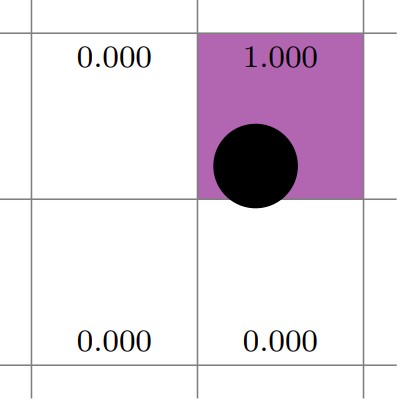
Fig. 5 Example of centroid deposition.
Trilinear
Trilinear deposition transfers particle properties to the eight Eulerian grid cells surrounding its center. First, low and high weights are calculated for each direction, then they are multiplied together to form eight composite weights. The following figure illustrates bilinear interpolation. The left image shows weights computed in the X-direction, \([0.15, 0.85]\), and the center image shows weights computed in the Y-direction, \([0.25,0.75]\). The right image shows the composite weights for the four cells that comprise the 2D neighborhood surrounding the particle.
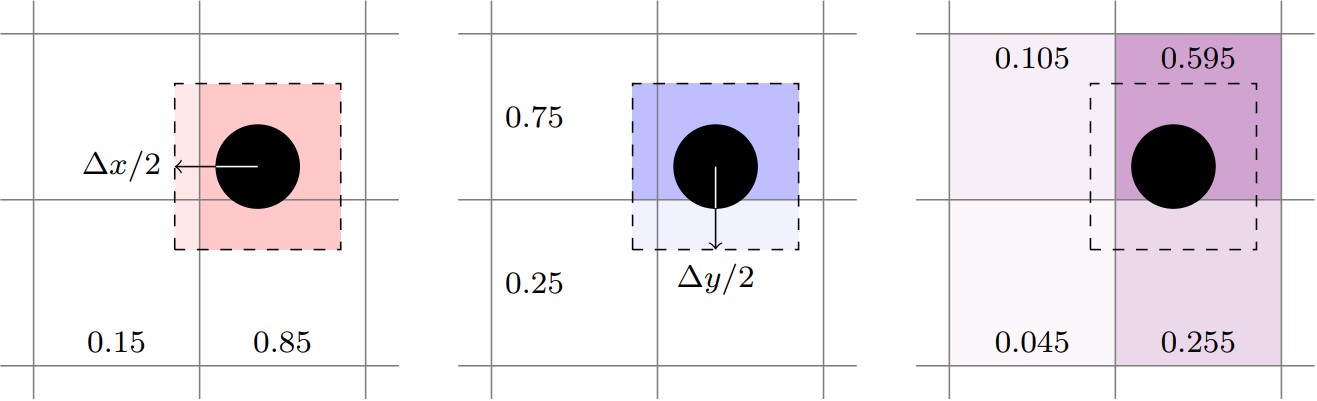
Fig. 6 Example of trilinear deposition.
True-DPVM
The “true” divided particle volume method (DPVM) calculates the actual volume
of a particle in each cell by computing the intersection between the grid cell
faces and the particle. The fractional volume (volume inside the cell
divided by total particle volume) is used as the deposition weight. If the
deposition_scale_factor is defined, it multiplies the particle radius
increasing the effective area to transfer properties over. The true-DPVM scheme is
illustrated below where the dashed line represents the scaled particle radius.
The grown particle intersects the top two and lower-right cells. Since the grown
particle does not intersect the lower-left cell, it has a deposition weight of zero.
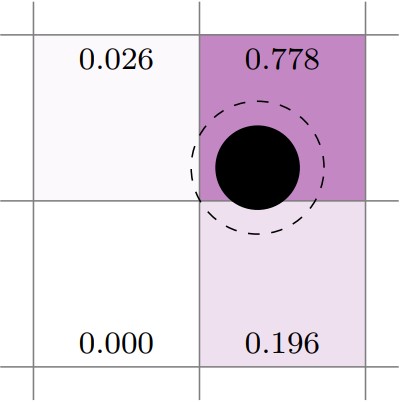
Fig. 7 Example of true-dpvm deposition.
Trilinear DPVM square
The trilinear DPVM square method is similar to the trilinear scheme in that
low and high weights are computed for each direction, then multiplied together
to give a composite weight for each of the eight cells in the neighborhood.
The primary distinction is that the fractional volume cut by the grid cell
face for each direction is used to calculate the low and high weights. If the
deposition_scale_factor is defined, it multiplies the particle radius
increasing the effective area to transfer properties over. In the below figure,
the left image shows the X-direction weights, and the center image shows
the Y-direction weights. The right image shows the resulting composite weights.
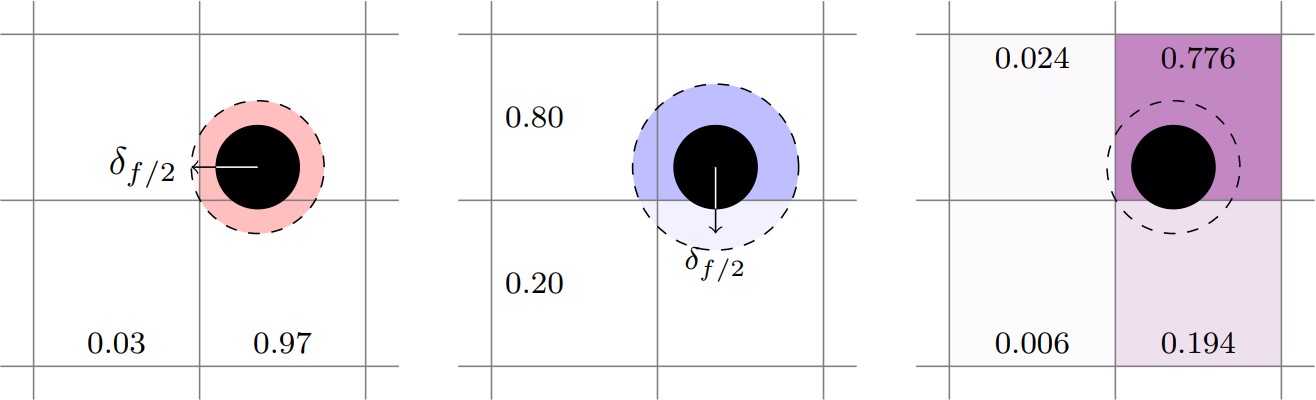
Fig. 8 Example of trilinear dpvm square deposition.
Deposition redistribution
The following inputs are defined using the prefix mfix.deposition.redistribution:
Key |
Description |
Type |
Default |
|---|---|---|---|
type |
Algorithm used to redistribute excess solids to adjacent cells. This typically applies only to small cut-cells along the geometry. Options:
|
String |
MaxPack |
maxpack.volfrac |
Threshold solids volume fraction for |
Real |
0.6 |
stateredist.volfrac |
Threshold geometric volume fraction |
Real |
0.1 |
Deposition filter
The filtering operation solves a diffusion equation to smooth deposited particle properties.
The following inputs are defined using the prefix mfix.deposition.filter:
Key |
Description |
Type |
Default |
|---|---|---|---|
type |
Algorithm used to redistribute excess solids to adjacent cells. This typically applies only to small cut-cells along the geometry. Options:
|
String |
None |
constant.size |
User defined constant filter size. Redistribution of transferred quantities only occurs when the solids volume fraction of a cell exceeds this value. |
Real |
Undefined |
variable.sample_size |
Variable filter sample size |
Real |
0.1 |
variable.min_eps |
Variable filter minimum volume fraction. |
Real |
0.1 |